Frontend Architecture: Server-Sent Events (SSE)
The Heavy Toll of WebSockets
When enterprise architects are tasked with building real-time interfaces—live financial tickers, deployment status dashboards, or streaming AI text generation—the default reflex is almost always to reach for WebSockets (or libraries like Socket.io).
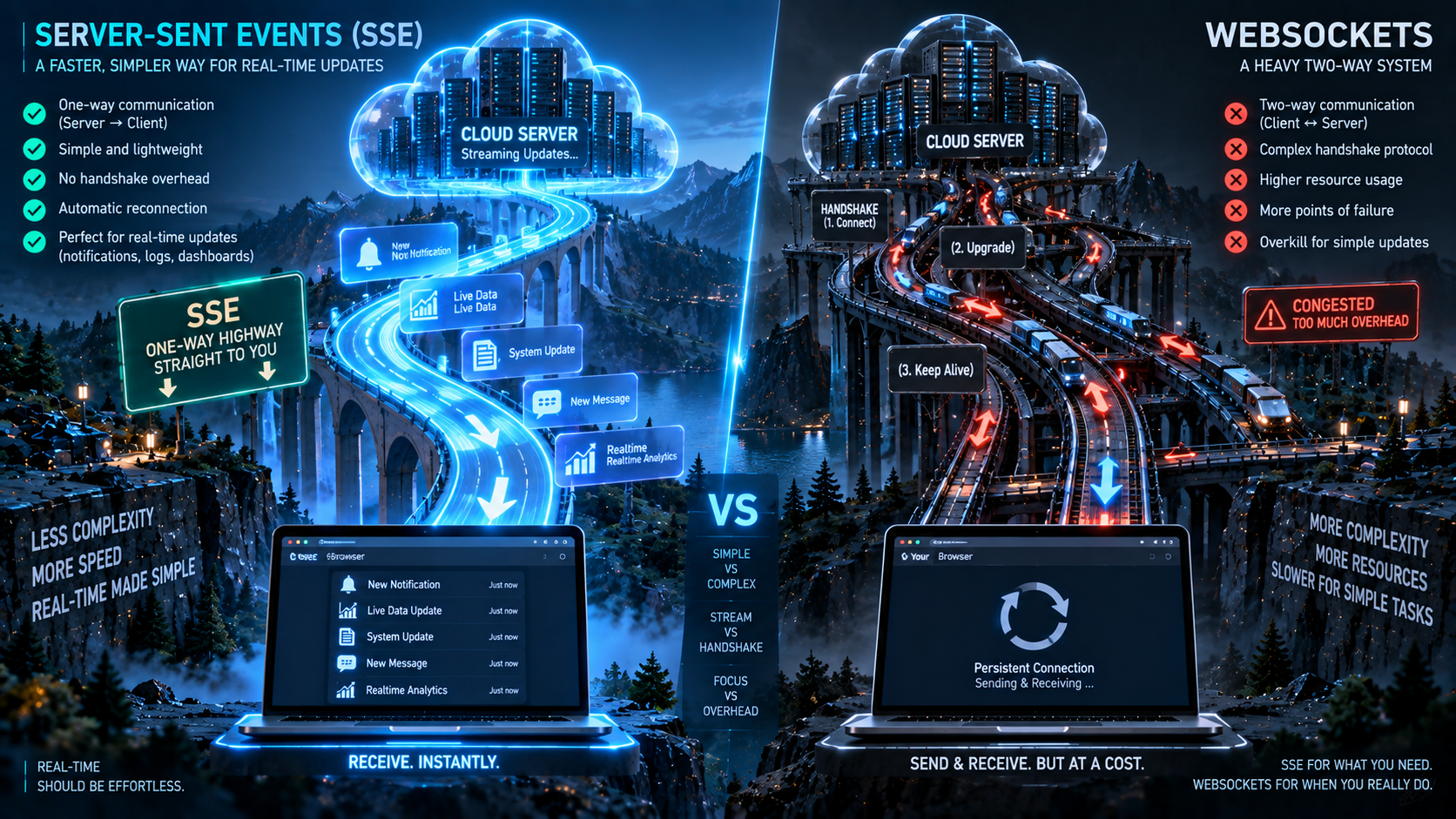
WebSockets are powerful, but they represent massive architectural overhead. WebSockets establish a persistent, bidirectional, stateful TCP connection over a custom protocol (ws://). Because they bypass standard HTTP, they frequently encounter brutal firewall restrictions in strict corporate environments. Furthermore, because the connection is stateful, balancing WebSocket traffic across a modern Kubernetes cluster requires complex Sticky Sessions and specialized ingress controllers, creating severe scaling bottlenecks.
At Smart Tech Devs, we challenge the WebSocket default. In 90% of real-time applications (like stock tickers or AI outputs), the client never needs to send continuous high-speed data back to the server. The data flow is entirely unidirectional (Server to Client). For these use cases, we architect Server-Sent Events (SSE), delivering flawless real-time streaming over standard HTTP infrastructure.
The Philosophy of Server-Sent Events (SSE)
Server-Sent Events is a native browser API. Unlike WebSockets, SSE operates entirely over standard HTTP (http:// or https://). The client makes a standard HTTP GET request, but instead of the server closing the connection after returning a JSON payload, the server keeps the HTTP connection open, pushing text-based data chunks down the pipeline indefinitely.
Because SSE uses standard HTTP, it seamlessly passes through corporate firewalls, requires no specialized load balancer configurations, natively supports HTTP/2 multiplexing, and includes built-in automatic reconnection logic—all without installing a single third-party NPM package.
Phase 1: Architecting the SSE Route Handler
In the Next.js App Router, we can implement an SSE endpoint by returning a native ReadableStream. This allows us to push data chunks to the client over an open connection.
// app/api/live-metrics/route.ts
export const dynamic = 'force-dynamic'; // Prevent Next.js from aggressively caching this route

export async function GET() {
    // 1. Architect the Web Stream
    const stream = new ReadableStream({
        async start(controller) {

            // For demonstration, we simulate a loop pushing live system metrics
            // In production, this would subscribe to a Redis Pub/Sub channel
            for (let i = 0; i < 100; i++) {

                // 2. Fetch fresh enterprise data
                const liveData = {
                    cpu_usage: Math.floor(Math.random() * 100),
                    active_users: 1500 + i,
                    timestamp: new Date().toISOString()
                };

                // 3. Format the payload according to the strict SSE protocol specification.
                // It MUST start with 'data: ' and end with double newline characters.
                const sseMessage = `data: ${JSON.stringify(liveData)}\n\n`;

                // 4. Encode and enqueue the chunk down the open HTTP connection
                controller.enqueue(new TextEncoder().encode(sseMessage));

                // Wait 2 seconds before sending the next metric
                await new Promise(resolve => setTimeout(resolve, 2000));
            }

            controller.close();
        }
    });

    // 5. Return the stream with specialized SSE Headers
    return new Response(stream, {
        headers: {
            'Content-Type': 'text/event-stream', // Crucial for browser recognition
            'Cache-Control': 'no-cache, no-transform',
            'Connection': 'keep-alive',
        },
    });
}
Phase 2: Consuming the Stream in React
Consuming an SSE stream on the frontend is incredibly elegant. The browser provides a native EventSource object. We encapsulate this logic inside a React useEffect hook to manage the connection lifecycle and prevent memory leaks.
// app/dashboard/LiveMetricsDashboard.tsx
'use client';

import { useEffect, useState } from 'react';

interface Metrics {
    cpu_usage: number;
    active_users: number;
    timestamp: string;
}

export default function LiveMetricsDashboard() {
    const [metrics, setMetrics] = useState(null);
    const [connectionStatus, setConnectionStatus] = useState('Connecting...');

    useEffect(() => {
        // 1. Open the native SSE HTTP connection
        const eventSource = new EventSource('/api/live-metrics');

        // 2. The 'onopen' event fires when the stream connects successfully
        eventSource.onopen = () => {
            setConnectionStatus('Live');
        };

        // 3. The 'onmessage' event fires every time the server pushes a chunk
        eventSource.onmessage = (event) => {
            // Parse the JSON payload pushed by the Next.js server
            const newData: Metrics = JSON.parse(event.data);
            setMetrics(newData);
        };

        // 4. SSE natively auto-reconnects if the network drops!
        eventSource.onerror = () => {
            setConnectionStatus('Reconnecting...');
        };

        // 5. Cleanup function: Close the connection if the component unmounts
        return () => {
            eventSource.close();
        };
    }, []);

    return (
        <div className="p-8 max-w-lg border rounded-xl shadow-lg bg-gray-900 text-white font-mono">
            <div className="flex justify-between items-center mb-6">
                <h2 className="text-2xl font-bold">Enterprise Metrics</h2>
                <div className="flex items-center gap-2">
                    <span className={`h-3 w-3 rounded-full ${connectionStatus === 'Live' ? 'bg-green-500 animate-pulse' : 'bg-red-500'}`}></span>
                    <span className="text-sm text-gray-400">{connectionStatus}</span>
                </div>
            </div>

            {metrics ? (
                <div className="space-y-4">
                    <div className="flex justify-between border-b border-gray-700 pb-2">
                        <span>CPU Utilization:</span>
                        <span className={metrics.cpu_usage > 80 ? 'text-red-400' : 'text-green-400'}>
                            {metrics.cpu_usage}%
                        </span>
                    </div>
                    <div className="flex justify-between border-b border-gray-700 pb-2">
                        <span>Active Sessions:</span>
                        <span className="text-blue-400">{metrics.active_users.toLocaleString()}</span>
                    </div>
                    <div className="text-xs text-gray-500 text-right mt-4">
                        Last Sync: {new Date(metrics.timestamp).toLocaleTimeString()}
                    </div>
                </div>
            ) : (
                <div className="animate-pulse text-gray-500">Awaiting telemetry stream...</div>
            )}
        </div>
    );
}
The Engineering ROI and HTTP/2 Multiplexing
Architecting Server-Sent Events instead of WebSockets fundamentally simplifies your infrastructure topology. Because SSE operates over standard HTTP, your existing Nginx configurations, WAFs, and CDN layers require absolutely zero modifications to proxy the traffic.
Historically, a limitation of SSE was the browser connection limit (allowing only 6 concurrent open connections per domain over HTTP/1.1). However, with the modern ubiquity of HTTP/2, this limit has been entirely eradicated through multiplexing, allowing hundreds of concurrent streams over a single TCP connection. For AI streaming, notification feeds, and real-time dashboards, SSE delivers the zero-latency performance of a WebSocket while maintaining the flawless reliability, auto-reconnection, and firewall immunity of a standard REST API.